Hardware
Von Neumann Architecture
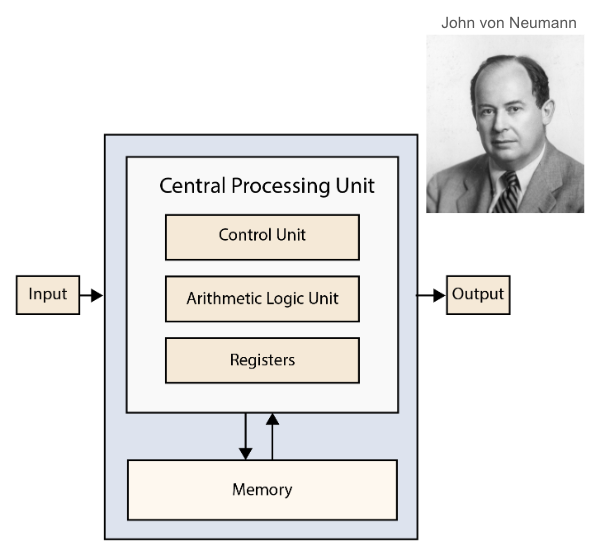
John von Neumann and von Neumann architecture.
The architecture of modern digital computers is based on the Von Neumann Architecture, proposed by John von Neumann in 1945. This architecture has become the foundation for most computers used today. It consists of several key components: the Central Processing Unit (CPU), memory, storage, and input/output (I/O) devices. The CPU acts as the brain of the computer, executing instructions and performing calculations. Memory stores data and instructions temporarily for quick access, while storage provides long-term data retention. I/O devices allow the computer to interact with the external world, enabling tasks such as data input and output display.
Central Processing Unit (CPU)
The CPU, often referred to as the brain of the computer, is responsible for executing instructions and performing calculations. It consists of several important components:
Control Unit (CU): This component directs the flow of data and operations between the CPU and other parts of the computer.
Arithmetic Logic Unit (ALU): The ALU performs arithmetic and logic operations using logic circuits or gates.
Registers: These are very fast memory locations built directly inside the CPU core, used to store data temporarily during processing.
Cache: This is high-speed memory that stores instructions and frequently accessed data to speed up processing.
There are different types of CPU architectures, such as Complex Instruction Set Computing (CISC) and Reduced Instruction Set Computing (RISC). The Instruction Set Architecture (ISA) defines the set of instructions that a CPU can execute, with common examples being x86/64, ARM, and RISC-V.
The CPU operates in a cycle known as the fetch-decode-execute cycle, which it performs billions of times per second (measured in gigahertz, GHz).
Memory

Examples of computer memory: RAM, SSD, HDD, SD card and HBM.
Memory in a computer system can be categorized into several types, each serving a specific function and located in different parts of the system. The fastest type of memory is the register, which is located inside the CPU cores. Registers store small amounts of data for immediate processing and operate at speeds of less than one clock cycle. However, their capacity is very limited, typically ranging from dozens to hundreds of bytes.
Cache memory, which can be found inside or near the CPU cores, is used to store less frequently accessed data for the CPU. There are different levels of cache, such as L1, L2, and L3, with varying speeds and capacities. Cache memory is very fast, operating within 2-4 to 20-50 CPU cycles, and its capacity can range from 32 KB to 128 KB per core for smaller caches, and from 4 MB to 64 MB for larger caches.
Main memory, or RAM, is located off-chip in DIMMs (Dual Inline Memory Modules). It stores active data and program instructions that the CPU needs to access quickly. Although slower than cache memory, taking hundreds of CPU cycles, RAM has a much larger capacity, typically ranging from 4 GB to 64 GB or more.
External storage, such as SSDs (Solid State Drives) and HDDs (Hard Disk Drives), is also located off-chip in drives. This type of memory is used for long-term data storage, including the operating system and files. External storage is much slower than RAM, with access times in the milliseconds range, but SSDs are faster than HDDs. The capacity of external storage is very large, ranging from 500 GB to 20 TB or more.
Video memory is dedicated to the GPU (Graphics Processing Unit) and is used to store graphics and image data. It is faster than RAM but slower than cache memory, with capacities ranging from a few gigabytes to tens of gigabytes.
High Bandwidth Memory (HBM) is integrated with the CPU or GPU and provides high-speed memory for intensive computing tasks. HBM is very fast, offering higher bandwidth than RAM, and its capacity ranges from a few gigabytes to tens of gigabytes.
Input and Output (I/O)
Input and output (I/O) devices are essential for a computer to interact with the external world. Input devices allow users to provide data and commands to the computer. Common input devices include keyboards, mice, microphones, touch screens, and various sensors. For instance, a keyboard lets you type text, a mouse helps you navigate the graphical user interface, and a microphone captures audio input. Touch screens combine display and input functionality, enabling direct interaction with the screen. Sensors can detect environmental changes, such as temperature or motion, and send this data to the computer. Network connections also serve as input channels, receiving data from other computers or the internet.
On the other hand, output devices enable the computer to convey information to the user or other systems. Monitors and displays are the most common output devices, presenting visual information such as text, images, and videos. Printers produce physical copies of digital documents, while speakers output audio signals, allowing you to hear sounds, music, or voice. Network connections can also act as output channels, sending data to other computers or devices over the internet.
The communication between these components is facilitated by a bus, a system that transfers data between different parts of the computer. The bus ensures that data flows smoothly between the CPU, memory, storage, and I/O devices. For high-speed internal connections, the Peripheral Component Interconnect Express (PCIe) is commonly used. PCIe is crucial for connecting components like GPUs, SSDs, sound cards, and network adapters. The number of PCIe lanes available is typically limited by the CPU, usually around 24 lanes.
For external devices, the Universal Serial Bus (USB) is widely used due to its versatility. USB ports can provide power and support various types of data transfer, including video, data, and power delivery. Thunderbolt is another high-performance interface similar to USB but offers higher speeds and greater capabilities, making it ideal for demanding applications, although it tends to be more expensive.
Understanding how these input and output devices work, and how they communicate with the rest of the computer, is fundamental to grasping the overall functionality of modern computing systems.
Improvement on Von Neumann Architecture
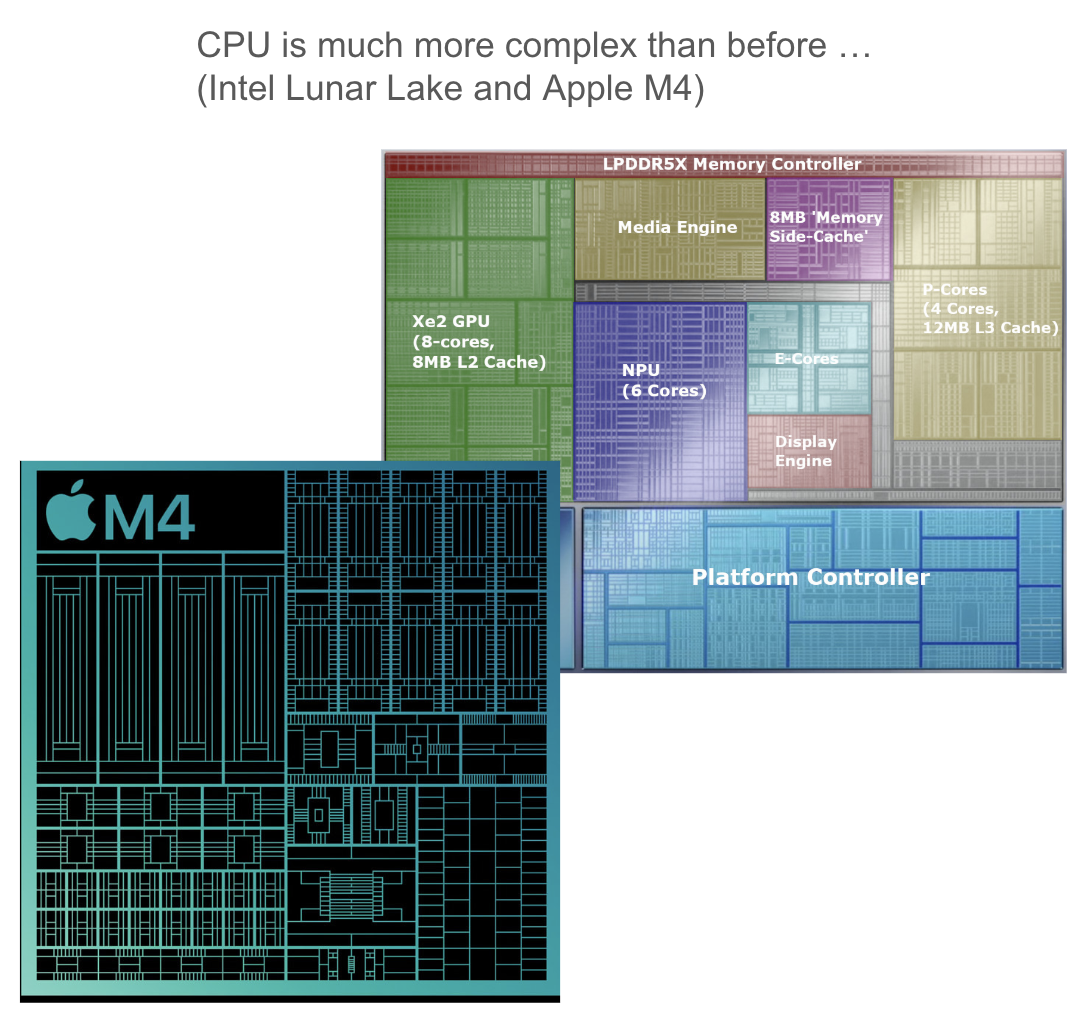
Examples of modern CPU or SOC: Intel Lunar Lake and Apple M4.
The Von Neumann Architecture, while foundational, has certain limitations, particularly the bottleneck in throughput between the CPU and the memory unit. This bottleneck arises because the CPU can process data much faster than it can be fetched from memory, leading to inefficiencies. To address this, modern computer systems employ a memory hierarchy that includes multiple levels of cache (L1, L2, and L3). These caches store frequently accessed data closer to the CPU, significantly speeding up data retrieval and improving overall performance.
Another significant advancement is the introduction of multi-core processors and hyper-threading technology. Multi-core processors contain multiple CPU cores on a single chip, allowing parallel processing of multiple tasks, which enhances performance and efficiency. Hyper-threading further improves performance by allowing each core to handle multiple threads simultaneously, making better use of CPU resources.
Specialized hardware has also been developed to handle specific tasks more efficiently than general-purpose CPUs. Graphics Processing Units (GPUs) are designed for parallel processing, making them ideal for graphics rendering and complex computations. Application-Specific Integrated Circuits (ASICs) are custom-built for particular applications, offering high performance and efficiency. Field-Programmable Gate Arrays (FPGAs) provide flexibility by allowing hardware reconfiguration for different tasks. Tensor Processing Units (TPUs) are specialized for machine learning workloads, delivering significant performance improvements for AI applications.
System-on-Chip (SoC) designs integrate all components of a computer or other electronic system into a single chip, reducing power consumption and improving performance. Non-Uniform Memory Access (NUMA) architecture is another innovation that enhances performance by allowing processors to access local memory faster than non-local memory, optimizing memory access times in multi-processor systems.
These advancements collectively address the limitations of the original Von Neumann Architecture, enabling modern computers to handle increasingly complex and demanding tasks with greater efficiency and speed.
Graphics Processing Unit (GPU)
The Graphics Processing Unit, commonly known as the GPU or graphics card, is a specialized processor designed primarily for rendering images and graphics. Initially, GPUs were developed to enhance video playback and gaming experiences, but their role has significantly expanded. Today, GPUs are crucial in scientific computing, machine learning, artificial intelligence, and even cryptomining.
GPUs come in two main types: integrated GPUs (iGPUs) and discrete GPUs (dGPUs). Integrated GPUs are built into the same chip as the CPU and use the system’s RAM as video memory (VRAM). In contrast, discrete GPUs are separate components with their own dedicated VRAM, which allows for better performance in graphics-intensive tasks.
One of the key features of GPUs is their architecture, which consists of thousands of small processing units. This design makes GPUs exceptionally good at parallel processing, allowing them to handle many simple tasks simultaneously. However, the clock speed of GPUs is generally lower than that of CPUs, typically ranging from 1 to 2 GHz.
In addition to their traditional role in graphics rendering, GPUs have evolved to support General Purpose computing on GPUs (GPGPU). This approach leverages the parallel processing capabilities of GPUs for non-graphics tasks, making them valuable for applications where parallelism is essential.
Programming for GPUs can be more challenging than for CPUs due to their unique structure and architecture. However, the performance benefits they offer for specific tasks make them an indispensable component in modern computing.
| Feature | CPU (Central Processing Unit) | GPU (Graphics Processing Unit) |
|---|---|---|
| Primary Function | General-purpose processing | Specialized for parallel processing and graphics rendering |
| Architecture | Few powerful cores | Thousands of smaller cores |
| Clock Speed | Higher (typically 2-5 GHz) | Lower (typically 1-2 GHz) |
| Parallelism | Limited parallelism | High parallelism |
| Memory | Uses system RAM and cache | Uses dedicated VRAM (for discrete GPUs) |
| Flexibility | Highly flexible, suitable for a wide range of tasks | Less flexible, optimized for specific tasks |
| Power Consumption | Generally lower | Generally higher |
| Use Cases | Running operating systems, applications, and general computing tasks | Graphics rendering, scientific computing, machine learning, AI, cryptomining |