Pymatgen Structure Advanced
In this practical, we will explore some advanced structure manipulation using pymatgen.
We will cover following:
Creating a supercell
Use
pymatgen’stransformationandtransmuterto manipulate structureDealing with disordered structure
Creating a Wulff shape
Creating a surface slab
from mp_api.client import MPRester

MP_API_KEY = "api-key"Supercell
You can create a supercell using pymatgen.core.Structure’s make_supercell() method. This method takes a scaling matrix as an argument. The scaling matrix is a matrix that defines the size of the supercell. For example, the scaling matrix [[2, 0, 0], [0, 2, 0], [0, 0, 2]] will create a supercell that is twice as large in each direction. You can use a scaling vector or a scaling factor as well. For example, 2 is equivalent to [[2, 0, 0], [0, 2, 0], [0, 0, 2]].
from pymatgen.core import Structure
Si_unitcell = Structure.from_id(id_="mp-149",api_key=MP_API_KEY)
Si_unitcell.to(filename="Si_unitcell.cif")

Si_supercell = Si_unitcell.make_supercell([2,2,2], in_place=False)

print(f"Si unitcell has {len(Si_unitcell.sites)} sites")
print(f"Si supercell has {len(Si_supercell.sites)} sites")Si unitcell has 2 sites
Si supercell has 16 sites
Transformations
You can apply transformations provided by pymatgen.transformations module. For example, you can apply a DeformStructureTransformation to deform a structure. You can also apply a StrainTransformation to apply a strain to a structure. You can also apply a RotationTransformation to rotate a structure. You can also apply a SupercellTransformation to create a supercell.
In this part we will use OrderDisorderedStructureTransformation to create a ordered structure from an disordered structure.
LiFePO4_structure = Structure.from_id(id_="mp-19017",api_key=MP_API_KEY)
LiFePO4_structure.to(fmt="cif", filename="LiFePO4.cif")
LiFePO4_structure.add_oxidation_state_by_element({"Li":1,"Fe":2,"P":5,"O":-2})

print(LiFePO4_structure)from pymatgen.transformations.standard_transformations import OrderDisorderedStructureTransformation, SubstitutionTransformation, AutoOxiStateDecorationTransformation
transformation = SubstitutionTransformation({"Li+":{"Li+":0.5}})
transformation.apply_transformation(LiFePO4_structure).to(fmt="cif", filename="LiFePO4_substituted.cif")"# generated using pymatgen\ndata_LiFe2(PO4)2\n_symmetry_space_group_name_H-M 'P 1'\n_cell_length_a 10.23619605\n_cell_length_b 5.97075510\n_cell_length_c 4.65491719\n_cell_angle_alpha 90.00002115\n_cell_angle_beta 90.00000000\n_cell_angle_gamma 90.00000000\n_symmetry_Int_Tables_number 1\n_chemical_formula_structural LiFe2(PO4)2\n_chemical_formula_sum 'Li2 Fe4 P4 O16'\n_cell_volume 284.49838986\n_cell_formula_units_Z 2\nloop_\n _symmetry_equiv_pos_site_id\n _symmetry_equiv_pos_as_xyz\n 1 'x, y, z'\nloop_\n _atom_type_symbol\n _atom_type_oxidation_number\n Li+ 1.0\n Fe2+ 2.0\n P5+ 5.0\n O2- -2.0\nloop_\n _atom_site_type_symbol\n _atom_site_label\n _atom_site_symmetry_multiplicity\n _atom_site_fract_x\n _atom_site_fract_y\n _atom_site_fract_z\n _atom_site_occupancy\n Li+ Li0 1 0.00000000 0.00000000 0.00000000 0.5\n Li+ Li1 1 0.50000000 0.50000000 0.50000000 0.5\n Li+ Li2 1 0.50000000 0.00000000 0.50000000 0.5\n Li+ Li3 1 0.00000000 0.50000000 0.00000000 0.5\n Fe2+ Fe4 1 0.78115127 0.25000000 0.52986573 1\n Fe2+ Fe5 1 0.71884873 0.75000000 0.02986773 1\n Fe2+ Fe6 1 0.28115127 0.25000000 0.97013327 1\n Fe2+ Fe7 1 0.21884873 0.75000000 0.47013327 1\n P5+ P8 1 0.09386630 0.25000000 0.41862257 1\n P5+ P9 1 0.40613370 0.75000000 0.91862357 1\n P5+ P10 1 0.59386630 0.25000000 0.08137543 1\n P5+ P11 1 0.90613370 0.75000000 0.58137643 1\n O2- O12 1 0.09423067 0.25000000 0.74478656 1\n O2- O13 1 0.83415452 0.54555803 0.71373534 1\n O2- O14 1 0.83415452 0.95444297 0.71373534 1\n O2- O15 1 0.90577033 0.75000000 0.25521444 1\n O2- O16 1 0.04430856 0.75000000 0.70986445 1\n O2- O17 1 0.40576933 0.75000000 0.24478556 1\n O2- O18 1 0.16584548 0.04555803 0.28626566 1\n O2- O19 1 0.66584548 0.45444197 0.21373434 1\n O2- O20 1 0.33415452 0.54555803 0.78626566 1\n O2- O21 1 0.33415452 0.95444297 0.78626566 1\n O2- O22 1 0.95569144 0.25000000 0.29013655 1\n O2- O23 1 0.45569144 0.25000000 0.20986345 1\n O2- O24 1 0.54430856 0.75000000 0.79013755 1\n O2- O25 1 0.59423067 0.25000000 0.75521544 1\n O2- O26 1 0.66584548 0.04555803 0.21373434 1\n O2- O27 1 0.16584548 0.45444197 0.28626566 1\n"Transmuter
You can use Transmuter to apply a list of transformations to a structure (or a list of structures).
from pymatgen.alchemy.transmuters import StandardTransmuter

transmuter = StandardTransmuter.from_structures([LiFePO4_structure])
transmuter.append_transformation(AutoOxiStateDecorationTransformation())
transmuter.append_transformation(SubstitutionTransformation({"Li+":{"Li+":0.5}}))
transmuter.append_transformation(OrderDisorderedStructureTransformation(), extend_collection=500)
print ("Total ordering:", len(transmuter))
Total ordering: 6
/Users/zeyudeng/apps/matsci/lib/python3.12/site-packages/pymatgen/core/structure.py:1476: UserWarning:

Structure charge (0) is set to be not equal to the sum of oxidation states (-2.0). Use Structure.unset_charge() to reset the charge to None.
Filter
You can use filters to remove structures from this list. For example, you can use RemoveDuplicatesFilter to remove structures that are symetrically equivalent.
from pymatgen.alchemy.filters import RemoveDuplicatesFilter

transmuter.apply_filter(RemoveDuplicatesFilter())
print(f"Total unique orderings: {len(transmuter)}")
Total unique orderings: 3
Surface Energy and Wulff Shape
We will construct a Wulff shape for a given surface energy. We will use pymatgen.analysis.wulff module to construct the Wulff shape. The surface energies will be obtained from the Materials Project database.
# Initialize the MP Rester
with MPRester(MP_API_KEY) as mpr:
    docs = mpr.materials.surface_properties.search(
        material_ids=["mp-149", "mp-13"],
    )

# dump results to a json file
import json
with open('materials_data.json', 'w') as f:
json.dump([doc.dict() for doc in docs], f, indent=4)for doc in docs:
print(doc.structure.composition.reduced_formula)
for surface in doc.surfaces:
print(f"Miller index {surface.miller_index} {surface.surface_energy}")
surface_structure = Structure.from_str(surface.structure, fmt="cif")
surface_structure.to(fmt="cif", filename=f"surface_{doc.structure.composition.reduced_formula}_{surface.miller_index}.cif")from pymatgen.analysis.wulff import WulffShape
# Create a Wulff shape from the surface energies
for doc in docs:
wulffshape = WulffShape(
lattice=doc.structure.lattice,
miller_list=[surface.miller_index for surface in doc.surfaces],
e_surf_list=[surface.surface_energy for surface in doc.surfaces],
)
print(f"{doc.structure.composition.reduced_formula}: shape factor: {wulffshape.shape_factor:.3f}, anisotropy: {wulffshape.anisotropy:.3f}, weighted surface energy: {wulffshape.weighted_surface_energy:.3f} J/m^2")
# Plot the Wulff shape
wulffshape.show()Si: shape factor: 1.169, anisotropy: 0.016, weighted surface energy: 1.437 J/m^2
Fe: shape factor: 4.942, anisotropy: 0.030, weighted surface energy: 2.527 J/m^2
/Users/zeyudeng/apps/matsci/lib/python3.12/site-packages/pymatgen/analysis/wulff.py:313: UserWarning:

FigureCanvasAgg is non-interactive, and thus cannot be shown
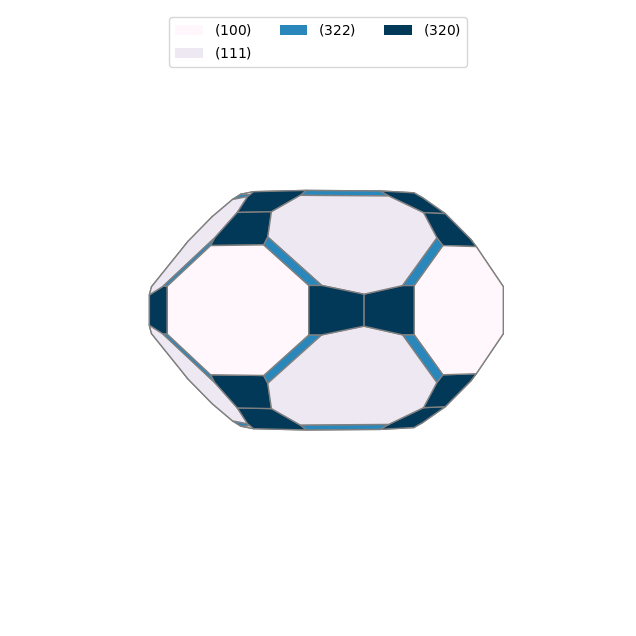
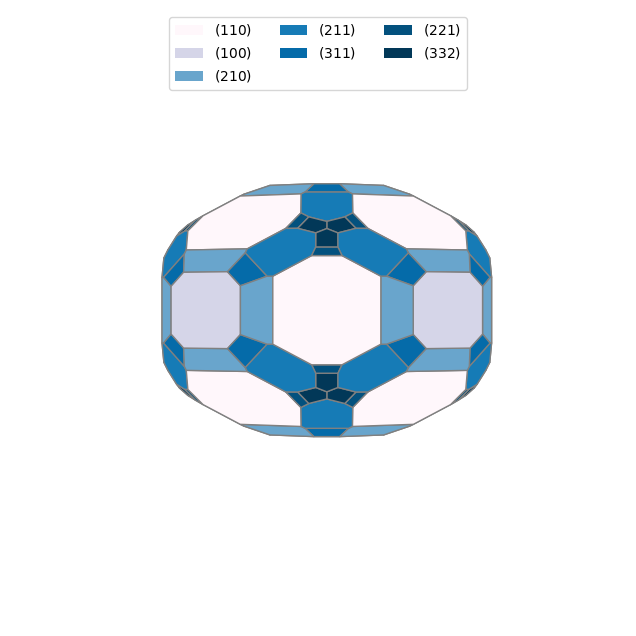
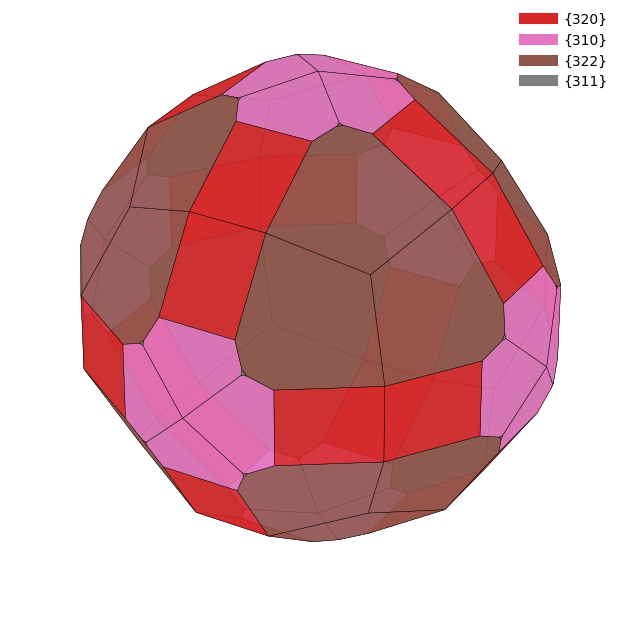
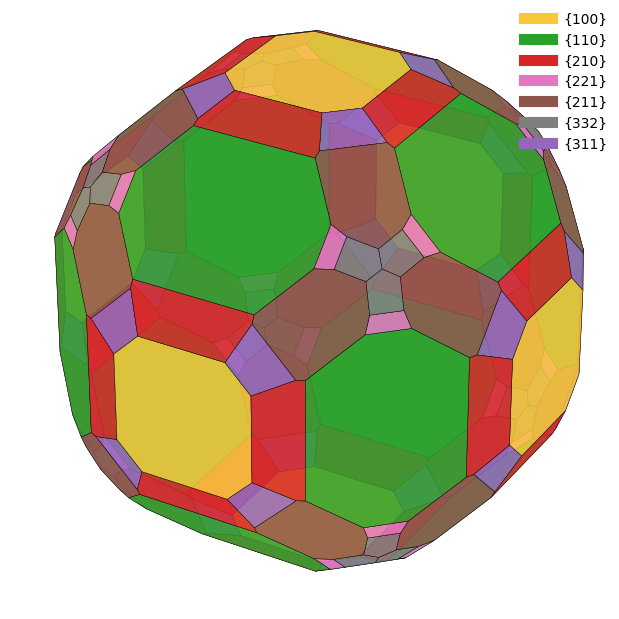
You can also use Wulffpack to construct a Wulff shape. But you need to install this package separately.
!pip install wulffpackfrom wulffpack import SingleCrystal
for doc in docs:
surface_energies = {tuple(surface.miller_index): surface.surface_energy for surface in doc.surfaces}
particle = SingleCrystal(surface_energies)
particle.view()/Users/zeyudeng/apps/matsci/lib/python3.12/site-packages/spglib/spglib.py:115: DeprecationWarning:
dict interface (SpglibDataset['rotations']) is deprecated.Use attribute interface ({self.__class__.__name__}.{key}) instead
Slab Model
We will use pymatgen.core.surface.SlabGenerator to create a slab model (pymatgen.core.surface.Slab), which is the key to compute surface properties. We will check if the Taskers condition is satisfied for a given slab by checking their polarity. Only symmetric slabs will be generated. Fe-O bonds will be cut in the slab model.
from pymatgen.core.surface import SlabGenerator

LiFePO4_structure.add_oxidation_state_by_element({"Fe": 2, "Li": 1, "P": 5, "O": -2})

slabgen = SlabGenerator(initial_structure=LiFePO4_structure,
                        miller_index=(1, 0, 0),
                        min_slab_size=2,
                        min_vacuum_size=10)

all_slabs = slabgen.get_slabs(bonds={("P", "O"): 2})
print(f"For the (001) slab of LiFePO4, there are {len(all_slabs)} terminations.")

for slab in all_slabs:
    print(f"Is polar? {slab.is_polar()}, is symmetric? {slab.is_symmetric()}")
For the (001) slab of LiFePO4, there are 2 terminations.
Is polar? True, is symmetric? False
Is polar? False, is symmetric? True
In the last example, we will generate lots of slabs of different Miller indices (up to 2) and check if they satisfy the Taskers condition. In this example, we will use pymatgen.core.surface.generate_all_slabs to generate all possible slabs for a given structure. Fe-O bonds will be cut in the slab model.
from itertools import product
from pymatgen.core.surface import generate_all_slabs
# Generate all possible miller indices
miller_indices = list(product(range(0,4), repeat=3))[1:] # Skip (0, 0, 0)

all_slabs = generate_all_slabs(structure=LiFePO4_structure,
                               max_index=2,
                               min_slab_size=10,
                               min_vacuum_size=10,
                               bonds={("P", "O"): 3})

for slab in all_slabs:
    print(f"{slab.miller_index} slabs of LiFePO4")
    print(f"Is polar? {slab.is_polar()}, is symmetric? {slab.is_symmetric()}")
    if slab.is_symmetric() and not slab.is_polar():
        print(f"Is polar? {slab.is_polar()}, is symmetric? {slab.is_symmetric()}")
        slab.to(fmt="cif", filename=f"LiFePO4_{slab.miller_index}.cif")
(1, 0, 1) slabs of LiFePO4
Is polar? True, is symmetric? False
(1, 0, 0) slabs of LiFePO4
Is polar? True, is symmetric? False
(1, 0, 0) slabs of LiFePO4
Is polar? False, is symmetric? True
Is polar? False, is symmetric? True
(0, 1, 0) slabs of LiFePO4
Is polar? True, is symmetric? False
(2, 1, 0) slabs of LiFePO4
Is polar? True, is symmetric? False
Heterogenous Interface
In the last example, we will create a heterogenous interface between and . We will use SubstrateAnalyzer to analyze the strain between the interface using the ZSL method, and then we will use CoherentInterfaceBuilder to build the interface.
from pymatgen.analysis.interfaces.substrate_analyzer import SubstrateAnalyzer

sub_analyzer = SubstrateAnalyzer(max_area_ratio_tol=0.09,
                                 max_area=800,
                                 max_length_tol=0.03,
                                 max_angle_tol=0.01,
                                 bidirectional=False
                                )

matches = list(sub_analyzer.calculate(film=LiFePO4_structure,
                                      substrate=Si_supercell,
                                      film_millers=[(1,0,0)],
                                      substrate_millers=[(1,1,1)]))
print(f"Found {len(matches)} matches")
for match in matches:
    print(f"Match area: {match.match_area:.2f}, strain {match.von_mises_strain:.3f}")
Found 18 matches
Match area: 555.87, strain 0.012
Match area: 555.87, strain 0.012
Match area: 555.87, strain 0.012
Match area: 555.87, strain 0.012
Match area: 555.87, strain 0.012
Match area: 555.87, strain 0.012
Match area: 722.63, strain 0.024
Match area: 722.63, strain 0.024
Match area: 722.63, strain 0.024
Match area: 722.63, strain 0.024
Match area: 722.63, strain 0.024
Match area: 722.63, strain 0.024
Match area: 778.21, strain 0.026
Match area: 778.21, strain 0.026
Match area: 778.21, strain 0.026
Match area: 778.21, strain 0.026
Match area: 778.21, strain 0.026
Match area: 778.21, strain 0.026
The matching algorithm is Zur and McGill, Journal of Applied Physics 55 (1984), 378 ; doi: 10.1063/1.333084. Coherent interface builder can analyze the termination of the interface and build the interface.
from pymatgen.analysis.interfaces.coherent_interfaces import CoherentInterfaceBuilder
from pymatgen.analysis.interfaces.zsl import ZSLGenerator


zsl = ZSLGenerator(max_area=800)
cib = CoherentInterfaceBuilder(film_structure=LiFePO4_structure,
                               substrate_structure=Si_unitcell,
                               film_miller=(1,0,0),
                               substrate_miller=(1,1,1),
                               zslgen=zsl)

print(f"Terminations: {cib.terminations}")
Terminations: [('Li_Pmmm_2', 'Si_R-3m_1'), ('O2_Pmmm_1', 'Si_R-3m_1'), ('PO_Pmm2_2', 'Si_R-3m_1'), ('O2_Pmmm_2', 'Si_R-3m_1'), ('Fe_Pmmm_1', 'Si_R-3m_1')]
Then we can build the interface by giving the termination.
interfaces=list(cib.get_interfaces(termination= ('O2_Pmmm_1', 'Si_R-3m_1'),
                                   film_thickness=2,
                                   substrate_thickness=5))
len(interfaces)
interface = interfaces[0]

interface.to(fmt="cif", filename="LiFePO4_Si_interface.cif")